
Caption Caddie Pro
Pro
$11.99/month
7-day free trial included. License key and download link emailed after checkout. Cancel anytime.
macOS-exclusive · from incoming photos to the desk
Cull. Caption. Edit. Deliver. A native Mac workflow built for sports photographers on deadline — roster-aware AI captions you Approve, editorial-safe Quick Edit, and FTP/FTPES delivery without leaving the app. Bring your own Google Gemini API key and pay Google about 5 photos for a penny, not a bundled AI subscription.
Tap a view below, then click the screenshot to open full size.
Session → Caption: roster-aware AI review before write-back
Caption Caddie 2.0 keeps the deadline workflow inside a persistent Session. Ingest live frames, cull what matters, caption and Quick Edit as needed, then deliver — without bouncing every stage through another app. Photo Mechanic and Lightroom still fit when you want them.
Caption Caddie was built by a sports photographer who takes wire assignments and lives inside AP, Getty, and Imagn XMP templates every game day. This is not a generic AI photo tool bolted onto sports. It is a deadline Session — cull, caption, finish, and deliver — built around the dateline, credit, keyword, and code-replacement workflows assignment shooters actually use.
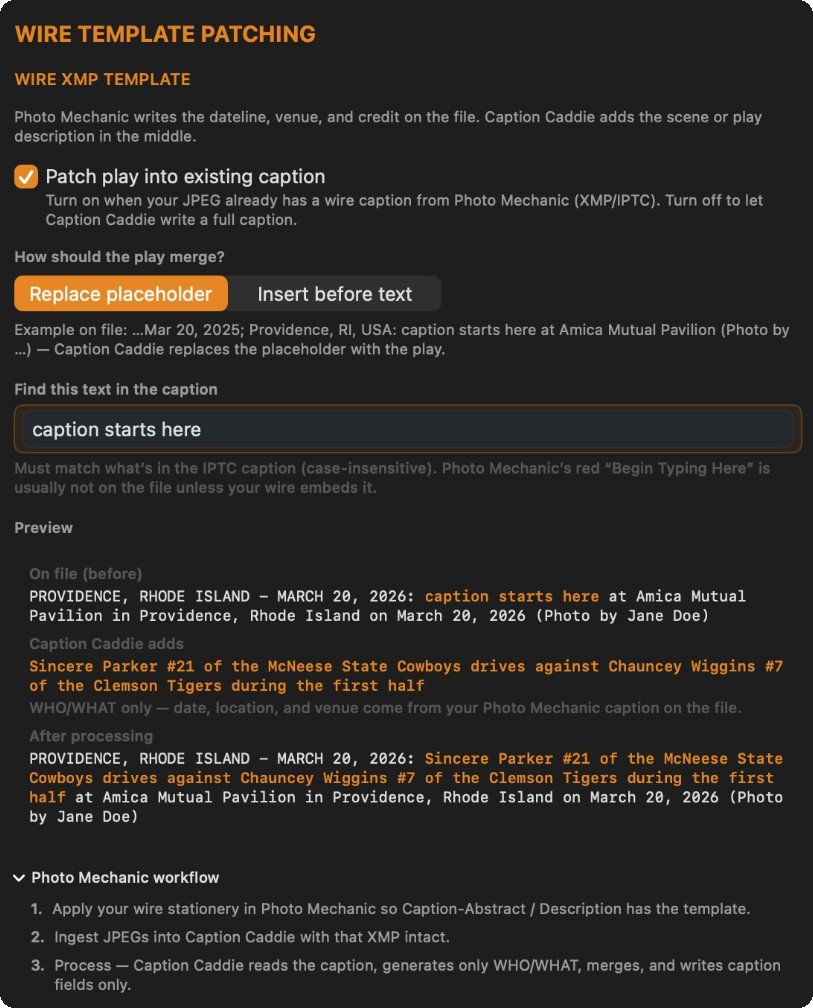
Caption Caddie is built for wire shooters who already apply dateline, credit, source, and keyword stationery in Photo Mechanic. It reads the XMP and IPTC metadata on your files and patches AI-generated caption text into your existing template fields, fully customizable per wire service or assignment.
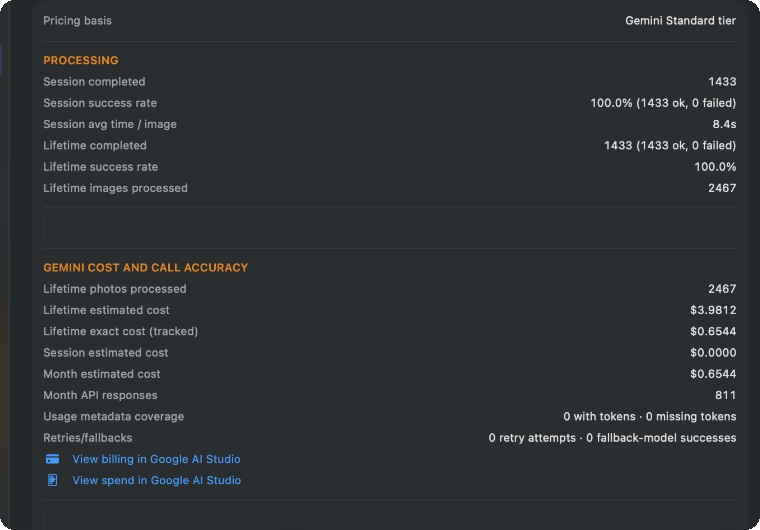
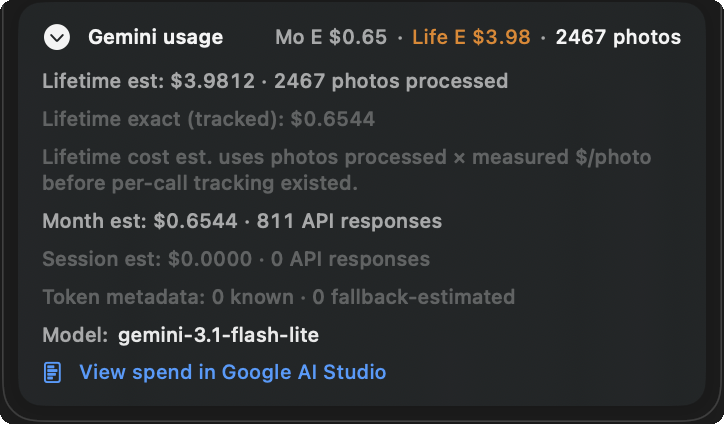
Cloud AI runs on your Google Gemini account, not a shared pool billed through us. Add your API key once in Settings; it stays in the macOS Keychain. You pay Google directly for what you use, about 5 photos for a penny in real-world testing, not a subscription markup on every frame.
Getting a key takes a few minutes in Google AI Studio. Caption Caddie tracks exact and estimated costs in Settings → Stats so you always know what an assignment run cost. Roughly $4 for about 2,400 images in testing, not four dollars per image.
Straightforward pricing
A simple monthly subscription for wire shooters. No bloated seat bundles, no surprise annual contract, and no hidden AI markup. You pay for the app, and Google bills your Gemini usage separately.
Caption Caddie Pro
$11.99/month
7-day free trial included. License key and download link emailed after checkout. Cancel anytime.
Deep dives on AI sports captioning, Photo Mechanic workflows, and AP, Getty, and Imagn wire metadata.
Roster-aware sports captioning, jersey and player identification, photographer review and Approve, and IPTC/XMP metadata.
Import code replacements, merge wire XMP templates, and auto-caption after cull and edit in PM.
AP, Getty, and Imagn caption styles, dateline and credit merge, and assignment deadline workflows.
Roster-aware AI captions with photographer Approve, plus Cull, Quick Edit, and Delivery — so finished frames leave Caption Caddie ready for the desk.
Persistent Sessions with Cull, Caption, Edit, and Delivery workspaces. Ingest once, then stay in the assignment until files are Sent.
Import rosters from CSV, JSON, Photo Mechanic text, or ESPN URLs. Matchups give AI the game context it needs — you Approve before IPTC/XMP write.
Rate and reject frames in Session. Caption only the selects that matter — including Not Captioned batches when you are ready.
Editorial-safe adjustments without leaving Session. Not generative image editing — finish selects for the wire, then keep moving.
See Selected, Exported, and Sent. Export Ready deliverables and transmit over FTP or FTPES without leaving Caption Caddie.
Generate captions in AP, Getty, or Imagn wire styles, or a Custom template that starts from the picture description and can add venue, event, date, and teams. Template edits stay local and do not require another AI analysis. Patch AI text into existing PM wire XMP fields when you use stationery: dateline and credit stay intact.
Code replacement import and export. Optional wire XMP merge. Use PM when it helps — Caption Caddie does not require it for Cull or Delivery.
Bring your own Google Gemini API key. About 5 photos for a penny, roughly $4 for ~2,400 images in testing. Stats track every session.
From matchup setup to Sent — inside one Caption Caddie Session.
Create a Matchup or Event, attach Teams, and set jersey colors. Connect your Gemini API key once in Settings.
Drop photos, use a watch folder, or import. Incoming frames land in a persistent Session for the assignment.
Rate and keep the frames worth working. Caption the filter you care about — not every file on the card.
Generate roster-aware captions, review identity, and Approve (⌘↩). Quick Edit when a frame needs a light finish — in either order.
Export Selected images and send via FTP or FTPES. Track Exported and Sent without leaving Caption Caddie.
No. Caption Caddie 2.0 can handle cull, caption, Quick Edit, and delivery in a Session on its own. Photo Mechanic remains a strong fit for ingest, wire stationery, and code replacements when you want it — Caption Caddie works with that stack, it does not require it.
AP, Getty Images, and Imagn wire styles, plus Custom captions. A Custom template starts with the picture description and can add assignment details such as venue, event, date, and teams. Changing that template stays on your Mac and does not require another AI analysis. Caption Caddie merges your Photo Mechanic wire XMP dateline and credit with AI-generated play descriptions.
Caption Caddie uses Apple Vision and Google Gemini to detect jersey numbers, routes teams by jersey color, applies roster-aware context, and generates publication-ready captions you review and Approve before writing to IPTC/XMP. AI completion is not approval.
Caption Caddie 2.0 covers the core deadline Session — Ingest, Cull, Caption, Quick Edit, and Delivery (including FTP/FTPES) — centered on roster-aware captioning. It is not a full DAM or Lightroom replacement. Bring deeper edits from other tools when you need them; stay in Caption Caddie when the desk is waiting.
Yes. Caption Caddie works with the XMP and IPTC templates you already apply in Photo Mechanic (AP, Getty Images, Imagn, or your own custom stationery). Templates are fully customizable, and AI captions are patched into your existing metadata fields instead of replacing the template work you did upstream.
Use supplemental metadata fields in your matchup to guide the AI: player names, groups, or event context you already know. For track and field, Gemini reads bib names and numbers when they are visible in the frame, even when there is no roster jersey number to match.
Yes, for cloud AI detection and captioning. You bring your own Google Gemini API key (stored in the macOS Keychain) and pay Google directly for usage. That keeps Caption Caddie affordable and transparent; you control your AI spend instead of subsidizing everyone else’s processing.
About 5 photos for a penny and ~$4 for roughly 2,400 images in real-world testing (gemini-3.1-flash-lite, $3.98 to $4.02 estimated). A full assignment night is dollars, not hundreds. Settings → Stats shows session, month, and lifetime cost with links to Google AI Studio billing.
No. Caption Caddie is a native macOS app built for Mac (macOS 15 or later). It is not available on Windows, Linux, iPad, or iPhone by design — built for the deadline Mac workflow sports photographers already run.
macOS 15 or later and a Google Gemini API key for cloud AI detection and captioning. Photo Mechanic is optional for wire XMP stationery and code replacements when you already use it.
Rosters and matchups stay on your Mac. When cloud processing is enabled, images are sent to Google Gemini under your API key. Keys are stored in the macOS Keychain.
Yes. Import rosters from Photo Mechanic text, CSV, JSON, or ESPN URLs. Export code replacements back to Photo Mechanic when needed.
Ross Harried of Second Crop Creative, a freelance sports photographer based in Wisconsin. Ross hates writing captions but loves solving problems, building things, and finding ways technology can help photographers instead of replacing them. He sees AI as a tool and an asset on deadline, not something to fear. His work has appeared in ESPN, The New York Times, Fox Sports, Forbes, and The Washington Post. He has been running Caption Caddie as a standalone app on his personal Mac since May 2026. It has picked up a lot of attention in media rooms, and fellow photographers keep asking when he will release it to the wild.
Caption Caddie runs on Mac only (macOS 15 or later. Not available on Windows, Linux, iPad, or iPhone.
Images are sent to Google Gemini under your account and API key when cloud processing runs. Caption Caddie does not resell AI credits. You pay Google directly, about 5 photos for a penny. Learn more in our privacy policy.